

Skip to content
  • Overview
  • Features
  • Try MailVault
  • Service Provider Edition
  • Pricing
  • Support
  • Blog
  • Contact
Releases, Using MailVault

User Management in MailVault

April 2, 2010 Team MailVault No comments yet

Generally speaking, user administration tasks can be time consuming, dull and often a waste of your technical administrator’s time. User management in MailVault is designed to change that.

A bunch of convenience features make life easy for the administrators and end-user self-service options means that your user’s can get things done, without waiting for a busy administrator to attend to them.
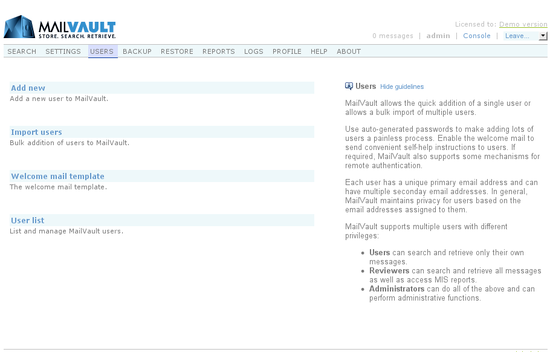


Understanding user roles
There are three types of users in MailVault. A user type, technically known as “Role” defines privileges and what a user is able to do in the MailVault system. There are three types of roles:

  1. User
  2. Reviewer
  3. Admin

The User role is what most end-users will be. Their actions are restricted to only their own mail,  i.e. email in which they are either a sender or recipient. They can search through their email, forward and even restore it – all without admin intervention.


The Reviewer role can do everything that a User can, with the additional privilege of being able to search through all email in the MailVault archive. This role is primarily meant for personnel with email auditing responsibilities.

The Admin role can of course do everything that User and Reviewer can – additionally it allows for administration of MailVault.


Adding users

Users can be added singly or in bulk.
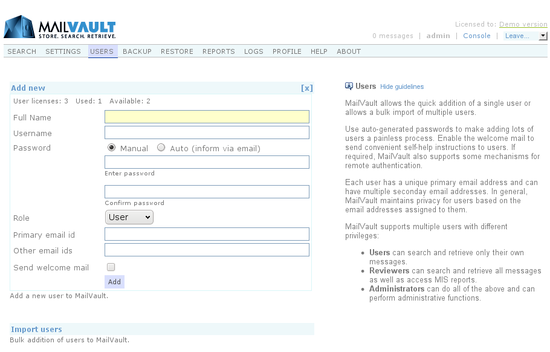


While adding a single user, the admin can specify the password in the conventional manual style or simply choose the Auto option to have MailVault send a self-activation email to the user. End of story. Each user must have a primary email id that is unique across all other users. Additionally, users may also have optional secondary email ids.


Bulk users can be imported into MailVault from various sources including CSV files, Active Directory and LDAP. MailVault can also import user’s directly from the popular PostMaster email server.


Welcome mail
An option welcome mail can be sent to user’s automatically when they are added to MailVault. This mail can carry a custom message and is a perfect way to inform employees about corporate email archiving policies, etc.


User list
The user list allows for listing, searching and modifying users. You can also export all MailVault users in a CSV format for use elsewhere.

And those are the basics of user management in MailVault.


  • email archiving
  • email backup
  • mailvault releases
  • mailvault security
  • secure access to mailvault
  • secure email backup
Team MailVault

Post navigation

Previous
Next

Categories

  • Announcements (10)
  • Blog (1)
  • Google Workspace (7)
  • MailVault Agent (3)
  • Microsoft 365 (6)
  • Releases (91)
  • Support (1)
  • Trends (3)
  • Using MailVault (66)

Recent posts

  • MailVault v6.1.4 released
  • MailVault v6.1.3 released (CAPTCHA, security advisories)
  • MailVault v6.1.2 released
  • MailVault v6.1.1 released

Tags

access email archive from outlook access email archive from thunderbird archive management archive manager central storage for email cloud storage for email compliance ediscovery email archival email archive management email archive space usage forecast email archiving email archiving solutions email backup email monitoring email restore google workspace GWS IMAP archiving journal account M365 mailvault cloud mailvault configuration mailvault installation mailvault releases mailvault security mailvault vps messaging surveillance microsoft 365 monitor email server OAuth 2.0 for email outlook backup outlook express backup PST backup PST restore restore via POP3 search email archive searching email search results secure access to mailvault secure email backup security thunderbird backup two-factor authentication (2FA) user management

Related posts

Releases, Using MailVault

MailVault v6.1.4 released

May 5, 2025 Team MailVault No comments yet

MailVault v6.1.4 is available. This release contains: Enhanced POP3 and IMAP mail sources for better handling of large mailboxes Some security related enhancements Other minor fixes and enhancements You can manually upgrade your MailVault installation by going to: Settings > Core > Auto updates and click on Check for updates Then simply follow the on-screen […]

Releases, Using MailVault

MailVault v6.1.3 released (CAPTCHA, security advisories)

March 27, 2025 Team MailVault No comments yet

MailVault v6.1.3 is available. This release contains: Introduced the use of CAPTCHA during user login (optional) Enforce that users change their password on next login (optional) Some security related advisories applied You can manually upgrade your MailVault installation by going to: Settings > Core > Auto updates and click on Check for updates Then simply […]

Releases, Using MailVault

MailVault v6.1.2 released

January 28, 2025 Team MailVault No comments yet

MailVault v6.1.2 is available. This release contains: Minor fixes and enhancements You can manually upgrade your MailVault installation by going to: Settings > Core > Auto updates and click on Check for updates Then simply follow the on-screen instructions.

Secure Your Organization's Valuable Emails with MailVault – M365 & Google Workspace Ready (works with any email service provider actually)

Important Links
  • MailVault SPE
  • Support
  • Blog
  • Privacy Policy
Resources
  • Overview
  • Features
  • Try MailVault
  • Pricing
Contact
  • DigitalGlue, 15 Creative Industries, Sunder Nagar, Road No. 2, Kalina, Santacruz (East), Mumbai, India
  • Sales & General: +91 22 40040548 / +91 22 49731418
    Technical Support: +91 22 49731418
  • info@digitalglue.in

© Copyright 2025, MailVault. All Rights Reserved.